
Testing and evaluating
During an optimization round you test how well the vragen.ai agent matches your organization, content and users. The vragen.ai AI agent can:
-
retrieve information from multiple sources on its own;
-
understand follow-up questions within the same context;
-
combine information;
-
show sources;
-
give insight into how an answer was produced.
The goal of the test round is to make sure the AI properly understands the user's intent, retrieves relevant information and gives fitting, useful answers.
What do you test for?
During each test round you look for where improvements are needed, for example:
-
does the AI understand the question correctly?
-
are the right sources being used?
-
does the answer fit the target audience?
-
is the answer factually correct and useful?
Based on the results you can improve the agent. This can involve:
-
the available content
-
search and retrieval behavior;
-
the interpretation of questions;
-
answer structure;
-
AI settings and instructions.
Two tasks during the test round
During a test round there are two kinds of work. One person can do both, or you split them across colleagues:
-
Testing: asking questions and assessing the answers.
-
Annotating: reviewing those assessments and the sources used, and making patterns visible.
Who is allowed to do this is controlled with the system roles: anyone with the Annotator or Editor role can test and annotate (see Managing users and roles). "Tester" and "annotator" below are therefore tasks, not separate access roles.
Testing
When testing, you assess how well the agent understands and answers questions.
1. Ask a question
Test realistic questions from different target audiences or situations.
Want to test a new topic? Always start a new conversation.
2. Assess the answer
Look at:
-
Completeness: has the question been fully answered?
-
Factual accuracy: is the information correct?
-
Usefulness: is the answer clear and actionable?
-
Source attribution: were the right sources used?
-
Audience fit: does the answer suit the user?
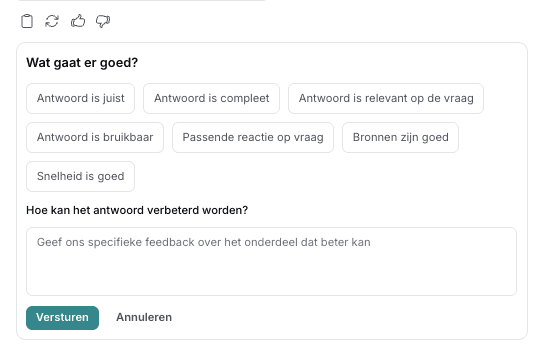
3. Give feedback
Use the thumbs up or thumbs down below the answer.
Describe as concretely as possible:
-
what went well;
-
what could be better;
-
what information is missing;
-
which source is wrong or missing.
The more concrete the feedback, the better the agent can be optimized.
4. Submit your feedback
Click Send to save your feedback.
Annotating
When annotating, you assess:
-
the quality of answers;
-
the sources used;
-
the feedback from testers.
You also help make patterns and areas for improvement visible.
Tasks of an annotator
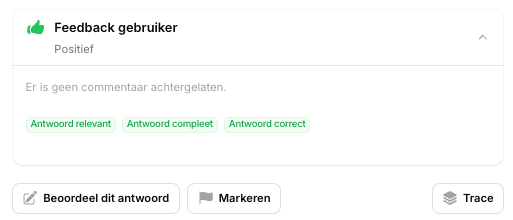
1. Review feedback
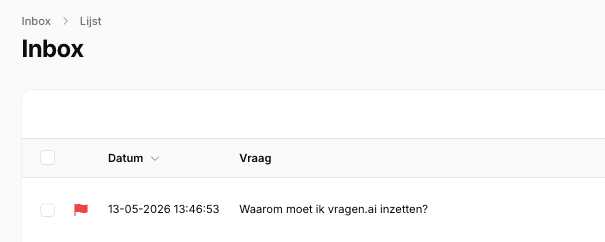
In the vragen.ai inbox, look at:
-
the question;
-
the answer;
-
the feedback;
-
and optionally the trace.
The trace shows:
-
which (reasoning) steps the AI took;
-
which sources were used;
-
how the answer was constructed.
2. Flag examples
Flag examples that are worth discussing with your team or the vragen.ai support team, such as:
-
strong answers;
-
recurring errors;
-
missing content;
-
wrong interpretations.
3. Summarize findings (optional)
The vragen.ai support team is always ready to help, so write a short summary of:
-
key insights;
-
recurring patterns;
-
areas for improvement.
This way we can think along effectively about how to optimize the agent.
Good to know
-
Feedback and annotations are linked to a username (if you are logged in to vragen.ai).
-
Not every mistake means the AI is malfunctioning; sometimes content or context is missing.
-
Every test helps make the agent smarter and more reliable.
Tips for a good test
-
Test from different target audiences.
-
Use both simple and complex questions.
-
Ask follow-up questions within the same conversation.
-
Also test synonyms, jargon and unclear questions.
-
Look not only at the answer, but also at the sources used
The evaluation scores in your inbox
Alongside human feedback, the AI evaluation scores help you monitor how well vragen.ai answers questions. Every answered question in your inbox gets three scores, on a scale of 0 to 100.
Reliability score
Reliability indicates to what extent the answer is based on reliable, verified information from your connected sources. A high score means the answer is well supported by relevant source data.
Relevance score
The relevance score shows how well the answer matches the question asked. The higher the relevance, the better the answer fits the user's information need.
Source relevance score
Source relevance indicates to what extent the source(s) used actually match the question. It measures how relevant the consulted documents or pages are to the specific answer.
What do you do when a score is low?
A single low score is no cause for concern; focus on questions or topics that score low consistently. Which score is low usually points to the cause:
-
Low reliability: content on this topic is missing, outdated or self-contradictory. Add the missing information to your website or rewrite the conflicting pages (see Best practices).
-
Low relevance: the answer doesn't really address the question. Often a page that covers exactly this question is missing; task-oriented content ("How do I apply for X?") helps most here.
-
Low source relevance: the AI finds sources, but not the right ones. Check for duplicates or outdated documents in your knowledge base, and if needed use knowledge scopes to limit which sources count (see Configuring vragen.ai).
After making a change, test with a control question to see whether the score improves (see the tip in Troubleshooting and support). Can't figure it out? Email service@vragen.ai; we're happy to take a look.