
vragen.ai WordPress plugin: AI search without a developer
With the official vragen.ai plugin for WordPress, you add an AI assistant to your site yourself, without a developer. The plugin sends your content to the knowledge base as soon as you publish or update.

Jelle Glebbeek AI developer
3 min read
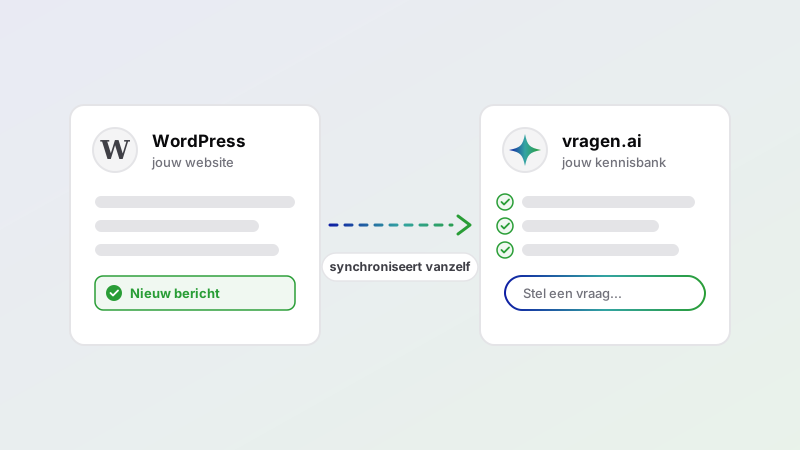
Until now, connecting vragen.ai to a website was mainly something for developers: a custom integration, a project, a schedule. That changes now. There is an official vragen.ai plugin for WordPress, and it lets you connect your site to a vragen.ai knowledge base yourself. You install the plugin, fill in your customer name and API token, and your content is synchronized.
For Drupal there was already an integration, and by default vragen.ai can crawl the contents of a site. This plugin goes a step further than crawling: it sends your content across in a structured way the moment you publish, update or delete. That is more precise and more up to date. Titles, metadata, taxonomies and languages all come across intact, and deleted content really does disappear from the index, without waiting for the next crawl.
Installing without a developer
Installation is self-service. You don't need a developer for it:
- Install and activate the plugin through Plugins → Add New Plugin.
- Go to Settings → Vragen.ai and fill in the customer name and API token from your vragen.ai account. A message confirms the connection works.
- Choose which content types you want to synchronize: posts, pages, attachments or your own custom post types.
- Run a bulk synchronization once to index existing content.
After that it runs automatically. Publish, edit or delete a post and the plugin updates the matching content in vragen.ai. No manual exports or separate sync scripts.
What the plugin does
- Automatic synchronization on publish, update, trash and delete, for the content types you choose.
- Background processing through Action Scheduler, so even large sites stay fast while indexing.
- Bulk synchronization and WP-CLI (
wp vragenai sync) for a first or scriptable import. - Text extraction from PDFs: linked PDFs are read server-side by vragen.ai.
- Multilingual for WPML and Polylang: all translations of a post are merged into one document, tagged with every available language.
- Semantic search that can replace the standard WordPress search, with a fallback to native search if the API is unexpectedly unreachable.
- Filters (
vragenai_should_index_post,vragenai_document_attributes) to adjust what gets indexed.
The admin interface is available in Dutch and English and follows the language of your site.
Showing vragen.ai on your site
Besides search, you can show a vragen.ai integration directly on your site. You set up and manage your integrations in your vragen.ai environment. In WordPress you then choose which one you use; the plugin pulls the list of integrations from your account.
- The vragen.ai block places an integration on a specific page or post. You pick the integration from the list.
- The site-wide embed shows an integration across your whole site, as a pop-up or side panel for example. You set that up once under Settings → Vragen.ai.
Showing related content
The plugin can automatically show related items with a post or page. Instead of linking
tags or pages by hand, vragen.ai works out which content is closest in substance based
on semantic similarity. You place this with the related-content block or the shortcode
[vragenai_related]. That keeps visitors on your site longer and helps them
find relevant information they would otherwise miss.
Who it's for
The plugin is meant for anyone with a lot of content on WordPress: municipalities with policy documents, knowledge organizations with hundreds of articles, or companies with an extensive help section. Once the content is synchronized, visitors get search results that match what they mean, instead of matching loose keywords.
What you need
WordPress 6.0 or higher, PHP 8.1 or higher, and a vragen.ai account with API details. You'll find your customer name and token in your vragen.ai environment.
Getting started
The plugin is on WordPress.org: wordpress.org/plugins/vragen-ai. No vragen.ai account yet? Start by reading what vragen.ai is, or create a demo.