Widgets for action-oriented and visual answers
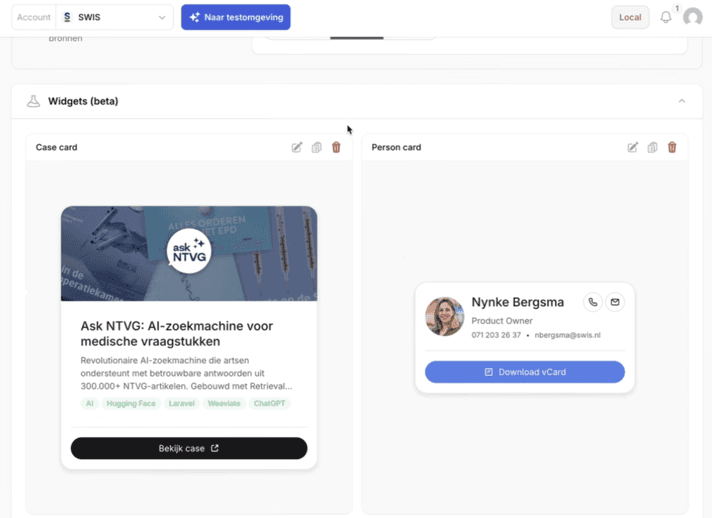
In vragen.ai, you can now work with widgets: compact, visual blocks that enhance an answer with relevant context. Think contact details, service information, or a concrete case. Directly visible in the answer, without the user having to explicitly ask for it.

Lisette Vredenburg
Product Owner
What makes widgets extra powerful is the visual freedom you have. Each widget can be fully styled via code, allowing it to seamlessly integrate with your organization's branding. Thus, the response not only feels smart but also like an integral part of your website or portal.
Widgets are available as a beta feature. You can start using them right away.
What can you do with it?
Where vragen.ai already helps by providing immediate answers to questions, widgets add an extra layer. This makes the response less text-driven and more visual. And especially: more focused on the next step.
A contact card helps someone reach the right person immediately. A product card guides you to the offerings. A case card provides more depth, exactly where the user shows interest. In this way, answers become not only more informative but also more action-oriented. And that opens the door to a richer, more intuitive user experience.
How does it work?
Manage Widgets in vragen.ai
You can create, view, or import widgets per agent. This allows you to quickly work with existing cards or easily add new ones.
Build your own via the Widget Builder
Through widget.chatkit.studio you can build your own widgets. This requires some technical knowledge but offers maximum freedom in form and content. From vragen.ai (SWIS), we're happy to assist you with this.
Smart deployment by the agent
The agent determines when a widget is relevant for the answer. You can also control this via the instructions. For example, it appears automatically:
a contact card for questions about an employee
a product card for interest in a service or offer
a case card for questions that require more depth
Beta – but promising
The widget feature is still in development. We are working on:
Clearer instructions for linking widgets
A library of reusable cards
This makes it increasingly easier to provide consistent, visually strong answers.
Why this matters
With widgets, you make answers richer, more concrete, and immediately applicable. Not only to display information but to give direction to the conversation. You help users to click through, get in touch, or read further. Precisely at the moment they are ready for it. Thus, the answer becomes the starting point for the next step.
With this development, we are also well-prepared for what's coming. Such as being able to register your own app within ChatGPT. Technologically, we are now ready for this.
Ready to get started?
Widgets are now available in beta.
Would you like to:
deploy widgets for your agents?
get help with building or importing?
set up your own widget library?
register your own app in ChatGPT?
Let us know. We are happy to brainstorm with you.